> ## Documentation Index
> Fetch the complete documentation index at: https://docs.tela.com/llms.txt
> Use this file to discover all available pages before exploring further.
# Creating new tasks
Within your Workstation App you can create tasks and review their output to check if the answers are correct.
## Creating tasks via API
Creating a new task is similar to making a call to your Canvas, except that instead of passing your `canvas_id`, you're going to pass your `application_id`.
Head to your Workstation App page and follow these steps:
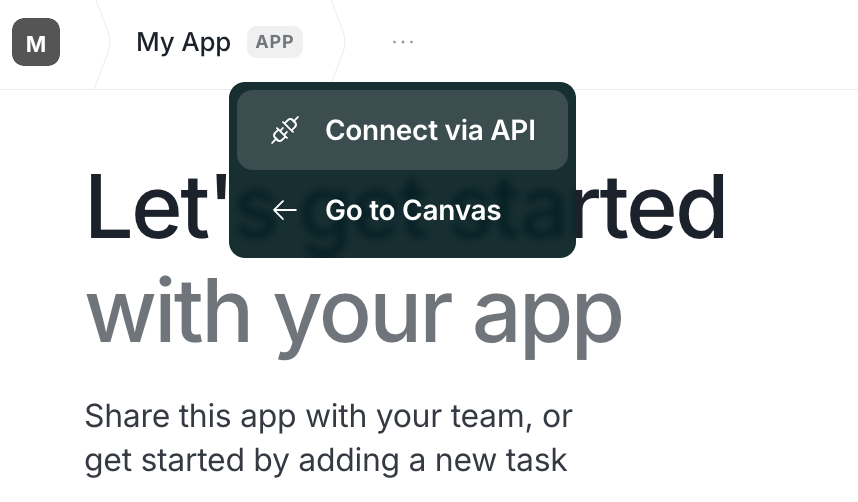
At the top bar, click on the three dots on the right of your app's title and select "Connect via API".
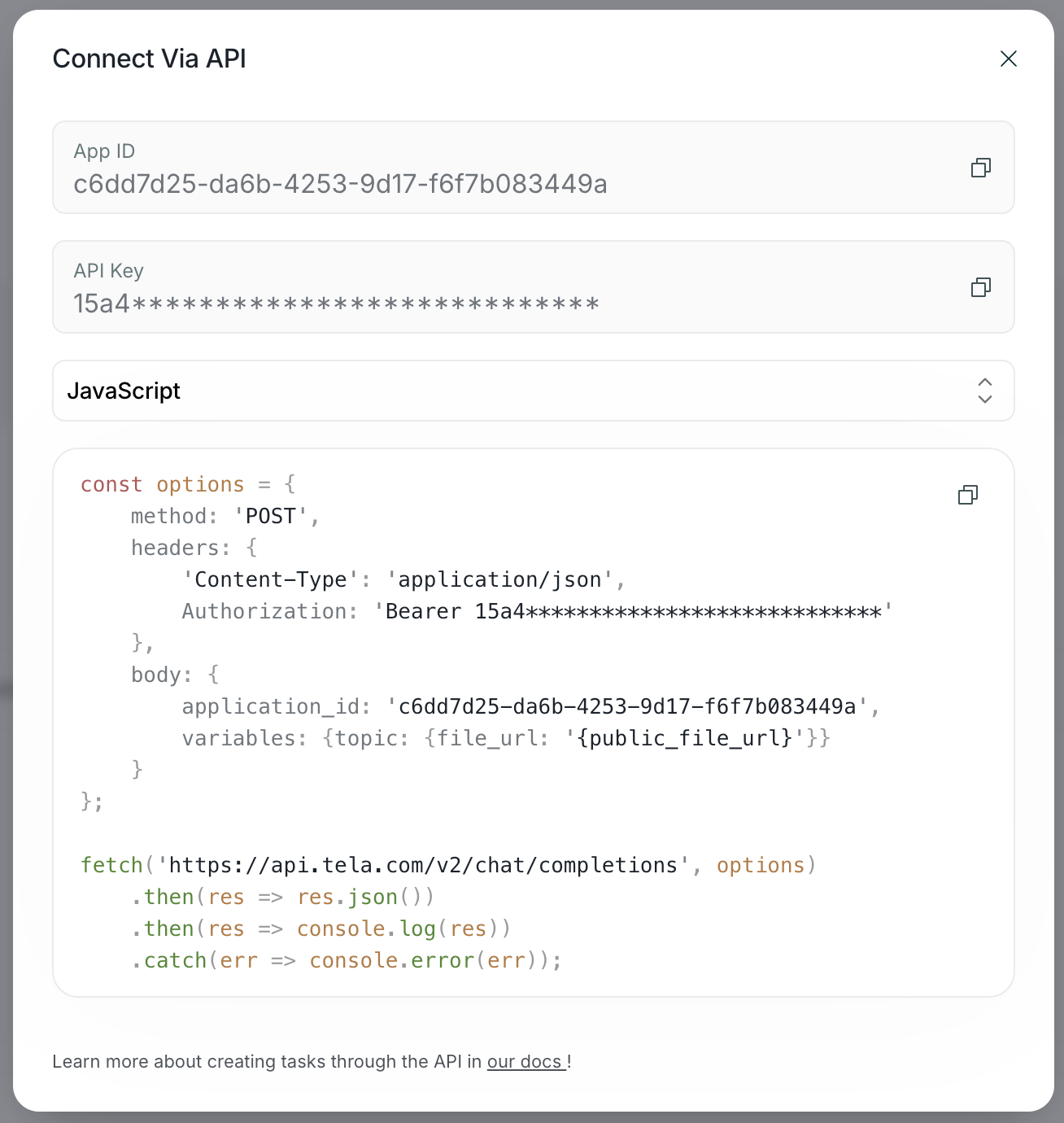
 Here you will find all the necessary info to start creating tasks with our API. Choose your preferred language and use one of the snippets provided to get started!
 By default, all tasks are created as if they were async completions. You'll receive a `success` response and the task will have a `running` status. You have two options for consuming the result of the task:
* Polling during execution
* Passing a webhook URL
### Polling tasks during execution
You can do a simple polling until the status of the task changes to either `completed` or `failed`. To poll the status of a task after creating it we can make a request to our API `/task` endpoint.
```typescript TypeScript Tela SDK theme={null}
let task = await tela.completions.create<{ document: TelaFile }, { fileSummary: string }>({
applicationId: process.env.TELA_APPLICATION_ID,
variables: {
document: tela.createFile('https://example.com/document.pdf')
},
})
let isTaskCompleted = false
while (!isTaskCompleted) {
const response = await fetch(`https://api.tela.com/task/${task.id}`)
task = await response.json()
isTaskCompleted = task.status === 'completed' || task.status === 'failed'
}
```
```javascript JavaScript Tela SDK theme={null}
let task = await tela.completions.create({
applicationId: process.env.TELA_APPLICATION_ID,
variables: {
document: tela.createFile('https://example.com/document.pdf')
},
})
let isTaskCompleted = false
while (!isTaskCompleted) {
const response = await fetch(`https://api.tela.com/task/${task.id}`)
task = await response.json()
isTaskCompleted = task.status === 'completed' || task.status === 'failed'
}
```
```python Python Tela SDK theme={null}
task = tela.completions.create(
application_id=os.getenv('TELA_APPLICATION_ID'),
variables={
"document": tela.create_file("https://example.com/document.pdf")
}
)
is_task_completed = False
while not is_task_completed:
response = requests.get(f'https://api.tela.com/task/{task.id}')
task = response.json()
is_task_completed = task.status in ['completed', 'failed']
```
### Passing a webhook URL
You can pass a `webhook_url` to your API call. This way you'll receive a `POST` request in your endpoint when the task finishes.
#### Webhook Response Structure
When a task completes, your webhook endpoint will receive a POST request with the following structure:
```json theme={null}
{
"id": "b83b1558-de5b-4e45-b517-7bececbdd154",
"status": "succeeded",
"input_content": {
"variables": {
"document": {
"file_url": "https://example.com/document.pdf"
}
},
"messages": []
},
"output_content": {
"role": "assistant",
"structured_content": false,
"content": {
"fileSummary": "This document contains quarterly financial reports showing a 15% revenue increase compared to last quarter, with key highlights in operational efficiency improvements and market expansion in the APAC region."
}
},
"raw_input": {
"application_id": "95cec438-6080-44fe-8275-28b16bd40178",
"variables": {
"document": {
"file_url": "https://example.com/document.pdf"
}
},
"webhook_url": "https://example.com/webhook"
},
"raw_output": {
"fileSummary": "This document contains quarterly financial reports showing a 15% revenue increase compared to last quarter, with key highlights in operational efficiency improvements and market expansion in the APAC region."
},
"compatibility_date": "2024-10-14",
"prompt_version_id": "76065caa-c519-441a-8fe2-cc43e29664ab",
"prompt_application_id": "95cec438-6080-44fe-8275-28b16bd40178",
"workspace_id": "3f55cfd9-4427-4887-a181-d9ad39967802",
"created_at": "2024-10-14T19:00:53.664Z",
"updated_at": "2024-10-14T19:01:15.892Z"
}
```
Key fields in the webhook response:
* `status`: Can be "created", "running", "succeeded", or "failed"
* `input_content`: Contains the variables and messages sent in the request
* `output_content`: Contains the structured output from your Canvas, matching your defined output schema
* `raw_output`: The raw output data in the format defined by your Canvas outputs
```typescript Typescript Tela SDK theme={null}
const task = await tela.completions.create<{ document: TelaFile }, { fileSummary: string }>({
applicationId: process.env.TELA_APPLICATION_ID,
variables: {
document: tela.createFile('https://example.com/document.pdf')
},
webhook_url: "https://example.com/webhook"
})
```
```javascript Javascript Tela SDK theme={null}
const task = await tela.completions.create({
applicationId: process.env.TELA_APPLICATION_ID,
variables: {
document: tela.createFile('https://example.com/document.pdf')
},
webhook_url: "https://example.com/webhook"
})
```
```python Python Tela SDK theme={null}
task = tela.completions.create(
application_id=os.getenv('TELA_APPLICATION_ID'),
variables={
"document": tela.create_file("https://example.com/document.pdf")
}
webhook_url="https://example.com/webhook"
)
```
```sh cURL theme={null}
curl -XPOST https://api.tela.com/v2/chat/completions \
-H 'Content-Type: application/json' \
-H 'Authorization: Bearer $TELA_API_KEY' \
-d '{
"application_id": $TELA_APPLICATION_ID,
"variables": {
"document": {
file_url: "https://example.com/document.pdf"
}
},
"webhook_url": "https://example.com/webhook"
}'
```
## Fetching tasks
To retrieve tasks from an app, you can send a `GET` request to the `/task` endpoint. This endpoint supports various optional parameters for filtering and pagination:
### Pagination parameters
* `limit`: Number of results per response (default: 10, range: 1-100)
* `offset`: Starting position of results (default: 0)
### Filtering parameters
* `status`: Array of task statuses (options: "created", "running", "validating", "completed", "failed")
* `since`: Start date for filtering tasks (format: timestamp or ISO 8601)
* `until`: End date for filtering tasks (format: timestamp or ISO 8601)
* `approvedBy`: Email of the user who approved the task
* `revisionProcess`: Type of revision received (options: "approvedWithRevisions", "approvedDirectly")
* `promptApplicationId`: ID of the application where the task was created
* `promptVersionId`: ID of the Canvas version used to create the task
* `ids`: Array of specific task IDs to retrieve
### Sorting parameters
* `orderBy`: Field to sort by (options: "name", "reference", "approvedAt", "createdAt", "updatedAt", "id", "status", "approvedBy", "createdBy")
* `order`: Sort direction (options: "asc" or "desc")
### Example request
Here's an example of fetching 50 completed tasks created after November 1st, 2024, sorted by name in ascending order:
```javascript JavaScript theme={null}
const url = new URL('https://api.tela.com/task')
url.searchParams.append('limit', '50')
url.searchParams.append('promptApplicationId', '{YOUR_APPLICATION_ID}')
url.searchParams.append('status', JSON.stringify(['completed']))
url.searchParams.append('since', '2024-11-01T00:00:00Z')
url.searchParams.append('orderBy', 'name')
url.searchParams.append('order', 'asc')
const response = await fetch(url, {
method: 'GET',
headers: {
'Authorization': `Bearer ${process.env.TELA_API_KEY}`,
'Content-Type': 'application/json',
},
});
const tasks = await response.json()
```
```python Python theme={null}
import requests
import os
response = requests.get(
'https://api.tela.com/task',
headers={
'Authorization': f'Bearer {os.getenv("TELA_API_KEY")}',
'Content-Type': 'application/json',
},
params={
'limit': 50,
'promptApplicationId': os.getenv('TELA_APPLICATION_ID'),
'status': '["completed"]',
'since': '2024-11-01T00:00:00Z',
'orderBy': 'name',
'order': 'asc',
}
)
tasks = response.json()
```
```sh cURL theme={null}
curl -X GET "https://api.tela.com/task?limit=50&promptApplicationId=$TELA_APPLICATION_ID&status=%5B%22completed%22%5D&since=2024-11-01T00%3A00%3A00Z&orderBy=name&order=asc" \
-H "Authorization: Bearer $TELA_API_KEY" \
-H "Content-Type: application/json"
```
By default, all tasks are created as if they were async completions. You'll receive a `success` response and the task will have a `running` status. You have two options for consuming the result of the task:
* Polling during execution
* Passing a webhook URL
### Polling tasks during execution
You can do a simple polling until the status of the task changes to either `completed` or `failed`. To poll the status of a task after creating it we can make a request to our API `/task` endpoint.
```typescript TypeScript Tela SDK theme={null}
let task = await tela.completions.create<{ document: TelaFile }, { fileSummary: string }>({
applicationId: process.env.TELA_APPLICATION_ID,
variables: {
document: tela.createFile('https://example.com/document.pdf')
},
})
let isTaskCompleted = false
while (!isTaskCompleted) {
const response = await fetch(`https://api.tela.com/task/${task.id}`)
task = await response.json()
isTaskCompleted = task.status === 'completed' || task.status === 'failed'
}
```
```javascript JavaScript Tela SDK theme={null}
let task = await tela.completions.create({
applicationId: process.env.TELA_APPLICATION_ID,
variables: {
document: tela.createFile('https://example.com/document.pdf')
},
})
let isTaskCompleted = false
while (!isTaskCompleted) {
const response = await fetch(`https://api.tela.com/task/${task.id}`)
task = await response.json()
isTaskCompleted = task.status === 'completed' || task.status === 'failed'
}
```
```python Python Tela SDK theme={null}
task = tela.completions.create(
application_id=os.getenv('TELA_APPLICATION_ID'),
variables={
"document": tela.create_file("https://example.com/document.pdf")
}
)
is_task_completed = False
while not is_task_completed:
response = requests.get(f'https://api.tela.com/task/{task.id}')
task = response.json()
is_task_completed = task.status in ['completed', 'failed']
```
### Passing a webhook URL
You can pass a `webhook_url` to your API call. This way you'll receive a `POST` request in your endpoint when the task finishes.
#### Webhook Response Structure
When a task completes, your webhook endpoint will receive a POST request with the following structure:
```json theme={null}
{
"id": "b83b1558-de5b-4e45-b517-7bececbdd154",
"status": "succeeded",
"input_content": {
"variables": {
"document": {
"file_url": "https://example.com/document.pdf"
}
},
"messages": []
},
"output_content": {
"role": "assistant",
"structured_content": false,
"content": {
"fileSummary": "This document contains quarterly financial reports showing a 15% revenue increase compared to last quarter, with key highlights in operational efficiency improvements and market expansion in the APAC region."
}
},
"raw_input": {
"application_id": "95cec438-6080-44fe-8275-28b16bd40178",
"variables": {
"document": {
"file_url": "https://example.com/document.pdf"
}
},
"webhook_url": "https://example.com/webhook"
},
"raw_output": {
"fileSummary": "This document contains quarterly financial reports showing a 15% revenue increase compared to last quarter, with key highlights in operational efficiency improvements and market expansion in the APAC region."
},
"compatibility_date": "2024-10-14",
"prompt_version_id": "76065caa-c519-441a-8fe2-cc43e29664ab",
"prompt_application_id": "95cec438-6080-44fe-8275-28b16bd40178",
"workspace_id": "3f55cfd9-4427-4887-a181-d9ad39967802",
"created_at": "2024-10-14T19:00:53.664Z",
"updated_at": "2024-10-14T19:01:15.892Z"
}
```
Key fields in the webhook response:
* `status`: Can be "created", "running", "succeeded", or "failed"
* `input_content`: Contains the variables and messages sent in the request
* `output_content`: Contains the structured output from your Canvas, matching your defined output schema
* `raw_output`: The raw output data in the format defined by your Canvas outputs
```typescript Typescript Tela SDK theme={null}
const task = await tela.completions.create<{ document: TelaFile }, { fileSummary: string }>({
applicationId: process.env.TELA_APPLICATION_ID,
variables: {
document: tela.createFile('https://example.com/document.pdf')
},
webhook_url: "https://example.com/webhook"
})
```
```javascript Javascript Tela SDK theme={null}
const task = await tela.completions.create({
applicationId: process.env.TELA_APPLICATION_ID,
variables: {
document: tela.createFile('https://example.com/document.pdf')
},
webhook_url: "https://example.com/webhook"
})
```
```python Python Tela SDK theme={null}
task = tela.completions.create(
application_id=os.getenv('TELA_APPLICATION_ID'),
variables={
"document": tela.create_file("https://example.com/document.pdf")
}
webhook_url="https://example.com/webhook"
)
```
```sh cURL theme={null}
curl -XPOST https://api.tela.com/v2/chat/completions \
-H 'Content-Type: application/json' \
-H 'Authorization: Bearer $TELA_API_KEY' \
-d '{
"application_id": $TELA_APPLICATION_ID,
"variables": {
"document": {
file_url: "https://example.com/document.pdf"
}
},
"webhook_url": "https://example.com/webhook"
}'
```
## Fetching tasks
To retrieve tasks from an app, you can send a `GET` request to the `/task` endpoint. This endpoint supports various optional parameters for filtering and pagination:
### Pagination parameters
* `limit`: Number of results per response (default: 10, range: 1-100)
* `offset`: Starting position of results (default: 0)
### Filtering parameters
* `status`: Array of task statuses (options: "created", "running", "validating", "completed", "failed")
* `since`: Start date for filtering tasks (format: timestamp or ISO 8601)
* `until`: End date for filtering tasks (format: timestamp or ISO 8601)
* `approvedBy`: Email of the user who approved the task
* `revisionProcess`: Type of revision received (options: "approvedWithRevisions", "approvedDirectly")
* `promptApplicationId`: ID of the application where the task was created
* `promptVersionId`: ID of the Canvas version used to create the task
* `ids`: Array of specific task IDs to retrieve
### Sorting parameters
* `orderBy`: Field to sort by (options: "name", "reference", "approvedAt", "createdAt", "updatedAt", "id", "status", "approvedBy", "createdBy")
* `order`: Sort direction (options: "asc" or "desc")
### Example request
Here's an example of fetching 50 completed tasks created after November 1st, 2024, sorted by name in ascending order:
```javascript JavaScript theme={null}
const url = new URL('https://api.tela.com/task')
url.searchParams.append('limit', '50')
url.searchParams.append('promptApplicationId', '{YOUR_APPLICATION_ID}')
url.searchParams.append('status', JSON.stringify(['completed']))
url.searchParams.append('since', '2024-11-01T00:00:00Z')
url.searchParams.append('orderBy', 'name')
url.searchParams.append('order', 'asc')
const response = await fetch(url, {
method: 'GET',
headers: {
'Authorization': `Bearer ${process.env.TELA_API_KEY}`,
'Content-Type': 'application/json',
},
});
const tasks = await response.json()
```
```python Python theme={null}
import requests
import os
response = requests.get(
'https://api.tela.com/task',
headers={
'Authorization': f'Bearer {os.getenv("TELA_API_KEY")}',
'Content-Type': 'application/json',
},
params={
'limit': 50,
'promptApplicationId': os.getenv('TELA_APPLICATION_ID'),
'status': '["completed"]',
'since': '2024-11-01T00:00:00Z',
'orderBy': 'name',
'order': 'asc',
}
)
tasks = response.json()
```
```sh cURL theme={null}
curl -X GET "https://api.tela.com/task?limit=50&promptApplicationId=$TELA_APPLICATION_ID&status=%5B%22completed%22%5D&since=2024-11-01T00%3A00%3A00Z&orderBy=name&order=asc" \
-H "Authorization: Bearer $TELA_API_KEY" \
-H "Content-Type: application/json"
```