

What are Credentials?
Credentials are encrypted key-value pairs that allow you to securely store sensitive information like API keys, tokens, and secrets. Instead of hardcoding sensitive values in your workflow code, you can reference them by name and the system will securely inject them at runtime.Why Use Credentials?
Managing Credentials
Accessing Credentials Settings
Navigate to Workspace Settings → Credentials to manage your workspace credentials.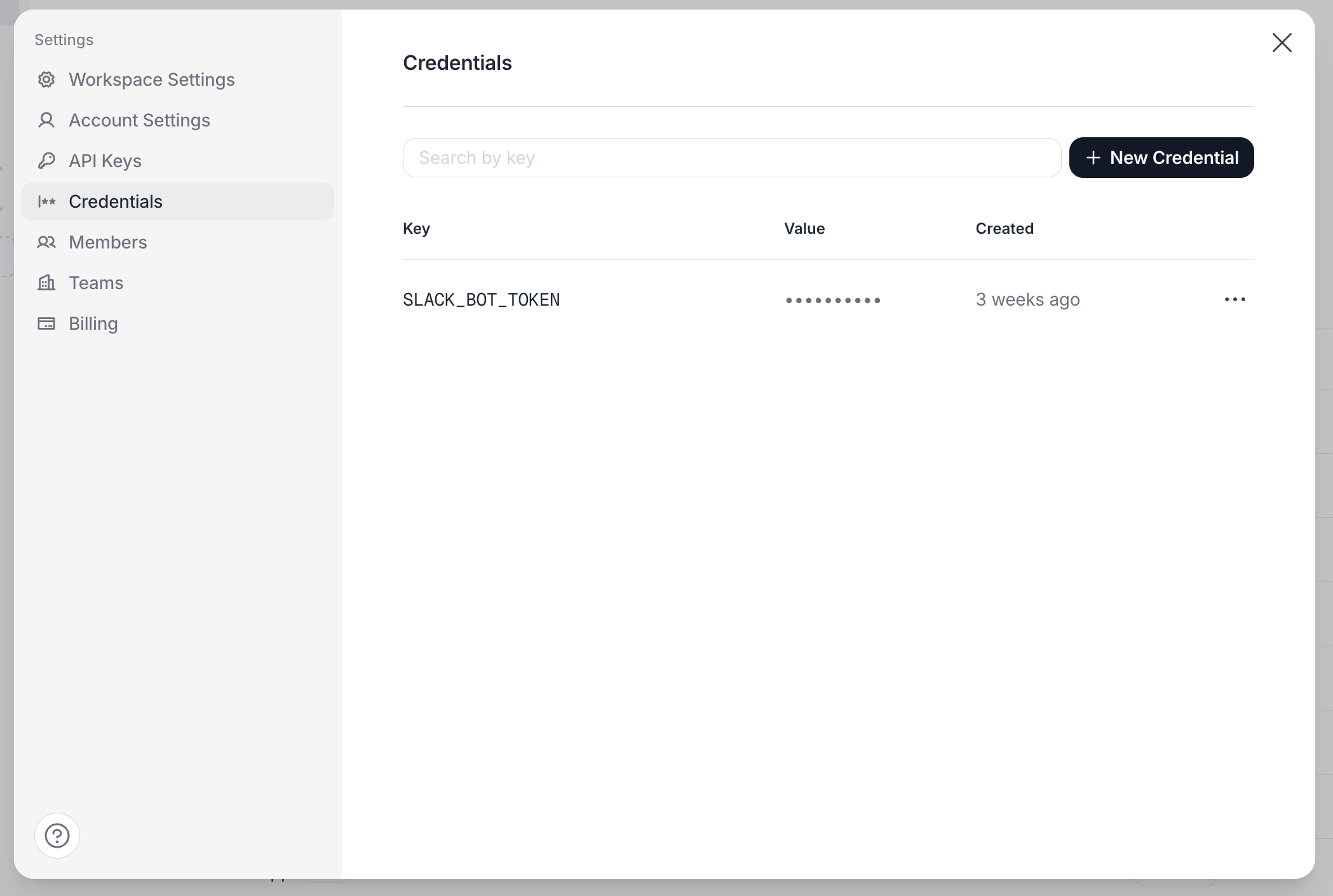
Creating a Credential
- Click Add Credential
- Enter a Key (identifier you’ll use in code, e.g.,
SLACK_BOT_TOKEN) - Enter the Value (the actual secret)
- Click Save
The credential value is encrypted before storage. Once saved, you cannot view the value again — you can only update or delete it.
Credential Key Naming
Choose descriptive, consistent names for your credential keys:Updating a Credential (Rotation)
To rotate a credential:- Find the credential in the list
- Click Edit
- Enter the new value
- Click Save
Deleting a Credential
Using Credentials in Code Execution
In Code Execution steps, use thecredential() function to retrieve secret values at runtime.
JavaScript/TypeScript
Using Credentials in Agents
When a workflow executes an Agent step, all workspace credentials are automatically available for the agent to use. The agent never sees their values: it refers to a credential by name, and Tela injects the value when the call is made. You can instruct the agent to use a specific credential by referencing its name in your prompt or agent configuration. For example, you can tell the agent: “Use the SLACK_BOT_TOKEN credential to send a message to the #general channel.”Credentials are inherited from the workflow’s scope. The agent receives the same credentials available to the workflow that triggered it.
How Credentials Work at Runtime
When a workflow step executes:- The system resolves all available credentials for the workspace
- Credentials are decrypted and injected into the step’s runtime environment
- The
credential()function reads from this secure context - Credential values are kept in memory only — never persisted in logs, outputs, or state
The system uses best-effort masking to prevent credential values from appearing in logs. However, if your code explicitly prints a credential value, it may still be visible.
Credential Scopes
Credentials can be defined at two levels:- Workspace level: Available to all workflows in the workspace (default)
- Workflow level: Specific to a single workflow, overriding workspace credentials with the same key
Workspace Credentials
Workspace credentials are the default scope. They’re available to all workflows and serve as the fallback when no workflow-scoped credential exists.Workflow-Scoped Credentials
You can create credentials that are specific to a single workflow. This is useful when:- A workflow needs a different API key than the workspace default
- You want to isolate credentials for security purposes
- Different workflows connect to different environments (staging vs production)
- Open the workflow you want to configure
- Click the Credentials button in the workflow header
- Add credentials specific to this workflow
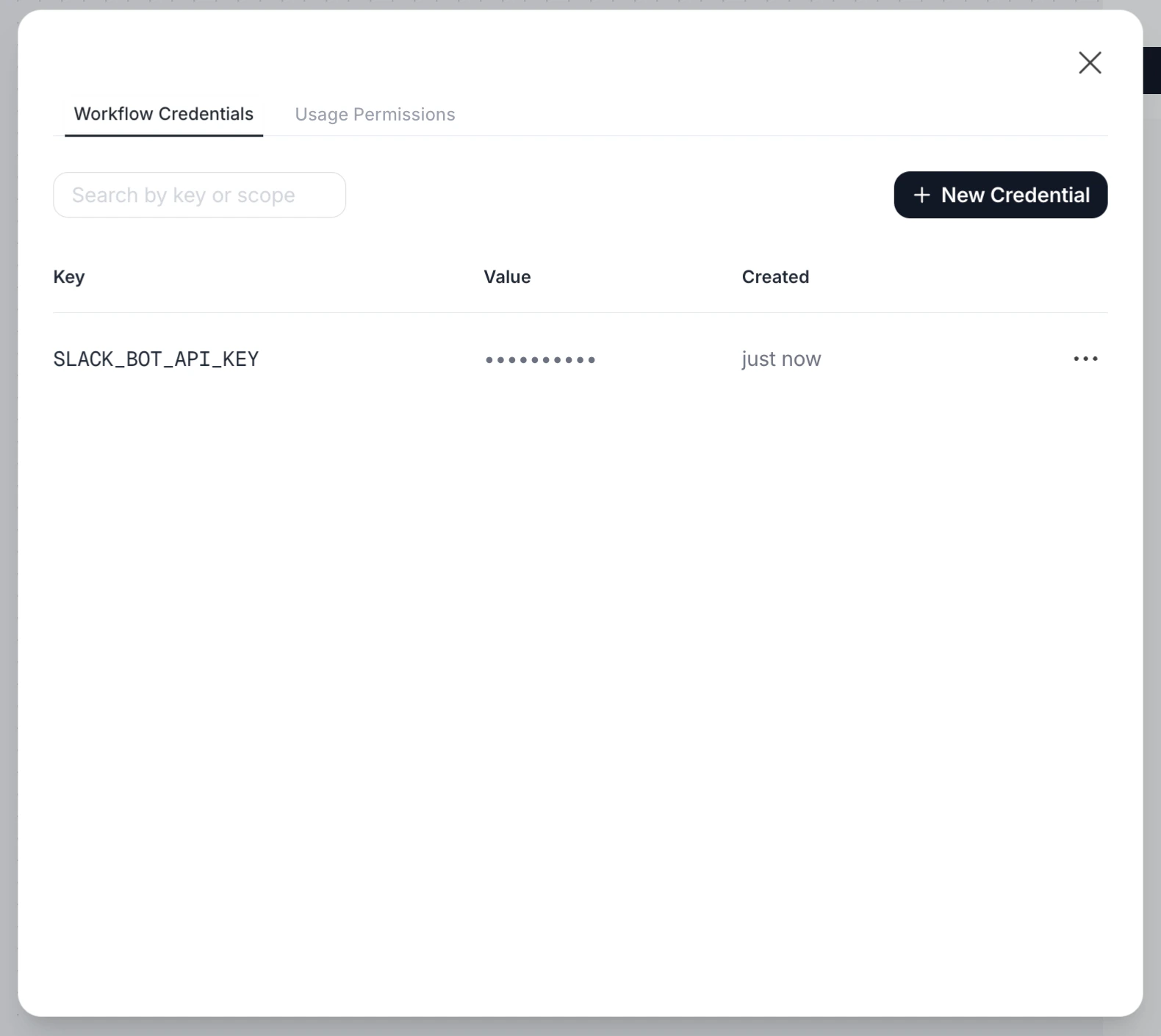
Workflow-scoped credentials with the same key as workspace credentials will override the workspace value for that specific workflow only.
Credentials Allowlist
For additional security control, you can define an allowlist of credentials for each workflow. When an allowlist is configured, only the specified credentials are accessible during workflow execution.Why Use an Allowlist?
Configuring the Allowlist
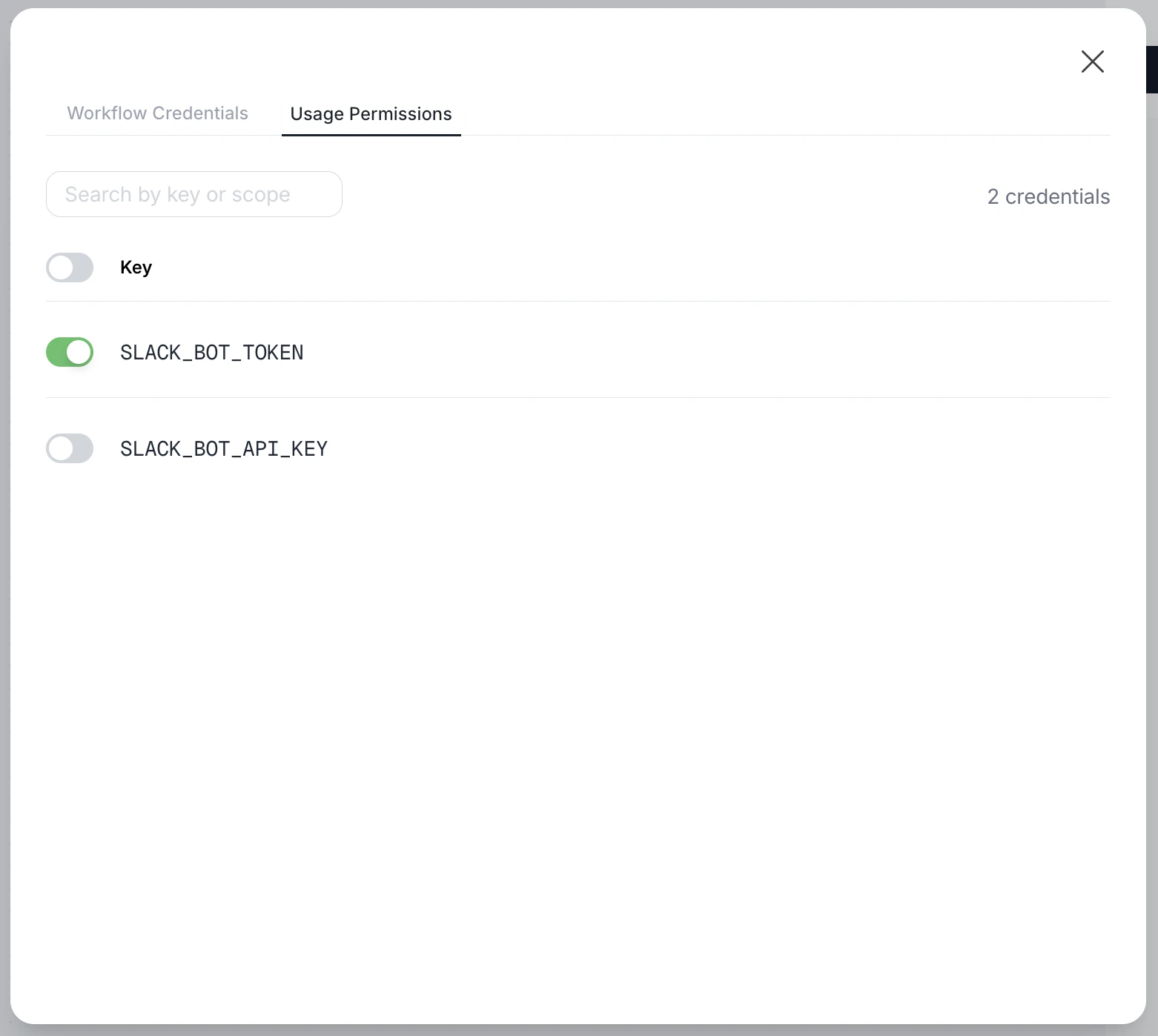
- Open the workflow you want to configure
- Click the Credentials button in the workflow header
- Go to the Usage Permissions tab
- Toggle on the credentials this workflow should have access to
Security Considerations
Encryption
All credential values are encrypted using AES-256-GCM before storage. Values are only decrypted at the moment of execution and kept in memory for the minimum time necessary.Access Control
- Only workspace administrators can create, update, or delete credentials
- Users with workflow edit/execute permissions can reference credentials by key, but cannot view values
Error Handling
Missing Credential
If your code references a credential that doesn’t exist:Best Practice: Validate Early
Check for required credentials at the start of your code:Best Practices
Do
- Use descriptive, consistent key names
- Rotate credentials periodically
- Use separate credentials for different services
- Test workflows after credential rotation
- Document what each credential is used for
Don't
- Hardcode secrets in workflow code
- Log or print credential values
- Share credential values outside the system
- Use the same credential for multiple purposes
- Delete credentials without checking dependencies
Frequently Asked Questions
Can I see a credential's value after creating it?
Can I see a credential's value after creating it?
No. For security reasons, credential values cannot be retrieved after creation. You can only update (overwrite) or delete them.
What happens if I rotate a credential during a workflow run?
What happens if I rotate a credential during a workflow run?
Each step resolves credentials at execution time. If a credential is rotated mid-run, subsequent steps will use the new value. Already-executing steps continue with the value they retrieved.
Can I use credentials in workflow configuration?
Can I use credentials in workflow configuration?
Credentials are available in Code Execution steps and Agent steps via the
credential() function. They cannot be used in workflow configuration fields or template strings.Is there a limit on the number of credentials?
Is there a limit on the number of credentials?
There’s no strict limit, but we recommend keeping credentials organized and removing unused ones to maintain clarity.
How do workflow-scoped credentials interact with workspace credentials?
How do workflow-scoped credentials interact with workspace credentials?
Workflow-scoped credentials take priority. If a workflow has a Workflow-scoped credential with key
API_KEY and the workspace also has API_KEY, the workflow will use its own workflow-scoped value. Other workflows without a workflow-scoped API_KEY will continue using the workspace value.What happens if I set an allowlist but forget a credential?
What happens if I set an allowlist but forget a credential?
The workflow will fail with a
missing_credential error when it tries to access the credential not in the allowlist. Make sure to test your workflows after configuring an allowlist.Can I use both workflow-scoped credentials and an allowlist?
Can I use both workflow-scoped credentials and an allowlist?
Yes. The allowlist controls which credential keys are accessible, and workflow-scoped credentials provide the values. If a key is in the allowlist, the system will first check for a workflow-scoped value, then fall back to workspace credentials.
What if my credential value is very long?
What if my credential value is very long?
Credential values can be up to 64KB. For larger secrets, consider storing them in a dedicated secret manager and using a credential to store the access token.
Summary
Credentials provide a secure, centralized way to manage sensitive values across your workflows, eliminating the need for hardcoded secrets and simplifying key rotation. With workflow-scoped credentials and allowlists, you have fine-grained control over which secrets each workflow can access.