

answer and risky_clauses.
What a result looks like
The result of a run depends on the Outputs of the Agent:- No attributes: the Agent answers in free text (Markdown). You read it, or pass it on as a text.
- Attributes: the Agent returns a JSON object with exactly those attributes. For the contract assistant:
risky_clauses breaks every consumer.
As a step of a Workflow
A Workflow can run an Agent as one of its steps, so the Agent’s judgment sits inside a process you drew in advance: receive the contract, run the assistant, route the contract to a senior lawyer whenrisky_clauses is not empty, otherwise generate the summary document.
In the Workflow, add the Existing Agent module (Add an existing Agent from your Organization). Click Select Agent and pick yours; the list marks each Agent as Published or Unpublished. Then click Assign Inputs: the panel lists the Inputs from Agent on one side and the Workflow Variables on the other, and you bind each Agent input to a Workflow variable or to the output of a previous step. Required inputs that are still unmapped are highlighted.
View Agent opens the Agent inside the Workflow context: a banner at the top reads Open inside workflow with the Workflow’s name and shows Assign Inputs with a counter of mapped inputs, the selectors next to each input let you bind them from there, and Back to Workflow returns you to the Workflow.
In the following steps, type @ to reference the output of the Agent step, the same way you reference any previous step; with structured Outputs, answer and risky_clauses are the fields of that output. The Agent inherits the credentials of the Workflow (see Credentials).
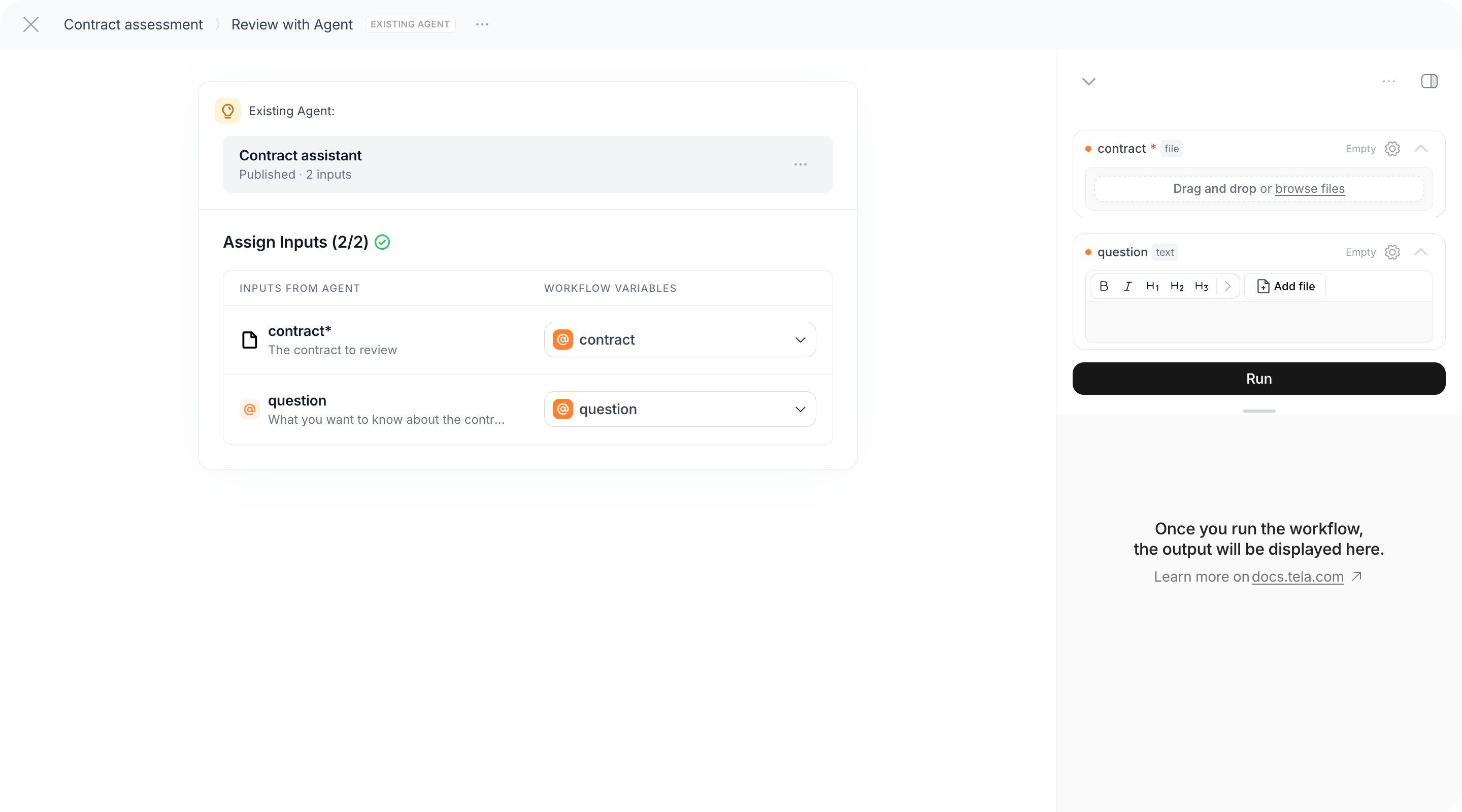
The step always runs the published version of the Agent, never your unpublished changes on
main. Publishing a new version of the Agent changes what every Workflow that uses it does from the next run on.From the API
Once the Agent is published, the… menu next to its title shows Connect via API. The dialog gives you the Agent ID and three ready-to-copy requests. Use the exact URL shown there: Agents run on a dedicated API, and the dialog already fills in the Agent ID and the inputs you declared.
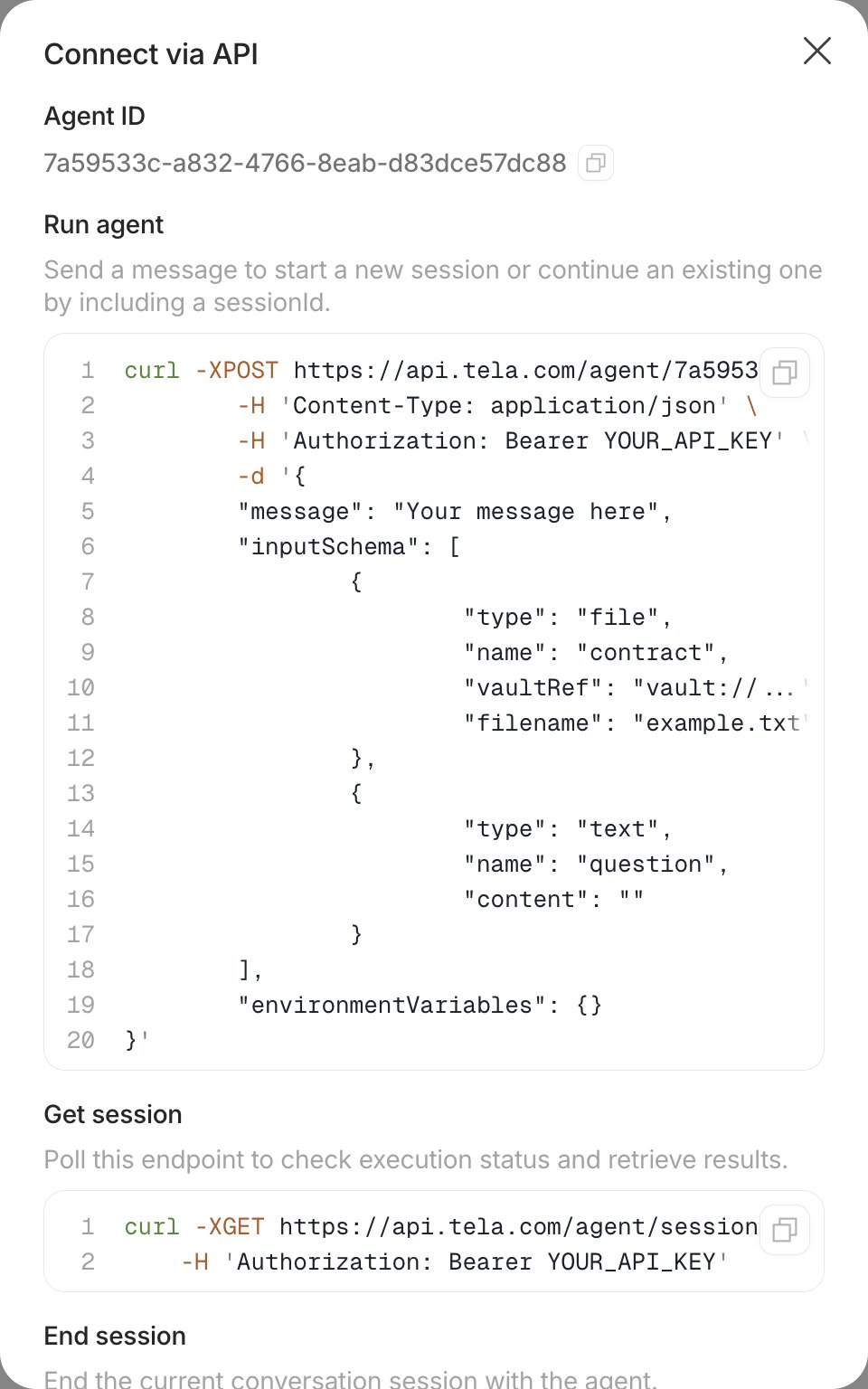
sessionId. The request body has a message, the inputSchema with one entry per declared input, and optional environmentVariables:
sessionId; the Agent works in the background.
Get session (Poll this endpoint to check execution status and retrieve results) returns the state of the session and, when it has finished, the result: the JSON object above, or the text. End session closes a conversation you no longer need.
For developers. A file input is a reference to a file in your Vault (
vault://…), with an optional display name. Executions are validated against the declared inputs: an unknown name, a type mismatch or a missing required input returns 400. A successful run settles in the waiting_messages status, not completed: the session is idle and ready for a follow-up message, which is a success. Running an unpublished Agent returns 400 Agent has no published version. Read the result from the last assistant turn of the session.As tasks
Tasks let several people hand work to an Agent and review the results, the way a Workstation does for a Canvas. Agent tasks are created through the task API with the Agent’s ID: there is no App to deploy. Send aPOST /task with sourceType: "agent", the agentId and up to 100 tasks, each with a name, its rawInput.variables named after the Agent’s inputs, and optional tags:
created, moves to running, then to validating when the output is ready and awaits review, and to completed once approved; failed and cancelled are terminal. List an Agent’s tasks with GET /task?agentId=… (this filter can’t be combined with promptApplicationId), read one with GET /task/{id} and approve or edit it with PATCH /task/{id}; for Agent tasks, an edited outputContent replaces the stored output as is. The result of a task is the same JSON object as above, and the task also records the agentSessionId of the run. See the Task API reference.
There is no page in Tela where Agent tasks are listed and reviewed like Workstation tasks. Plan to read and approve Agent tasks through the API.
For developers. File values of an Agent task are
{ vaultRef, filename }, one file per variable. Agent tasks don’t support rerun, undo approval, promotion to a test case, analytics or versions.On a schedule
In the… menu next to the title, Schedule runs the Agent by itself at set times, recurring or once. Schedules always run the published version, so publishing changes what the next scheduled run does. An Agent must be published before it can be scheduled; each scheduled run appears in Usage like any other session. See Schedules for frequencies, time zone and history.
Reading results after the fact
Every run, whatever started it, is listed in the Usage experience with its status, cost and a Run details view showing the timeline and the result. See Usage: the run history. A run in Usage can be shared by link with teammates who have access to the Agent.Agents don’t have the Deploy App option that Canvases and Workflows have in their publish dialog. To give a team a form-like interface for an Agent, run it as a step of a Workflow and deploy that Workflow as an App.