

AI Module
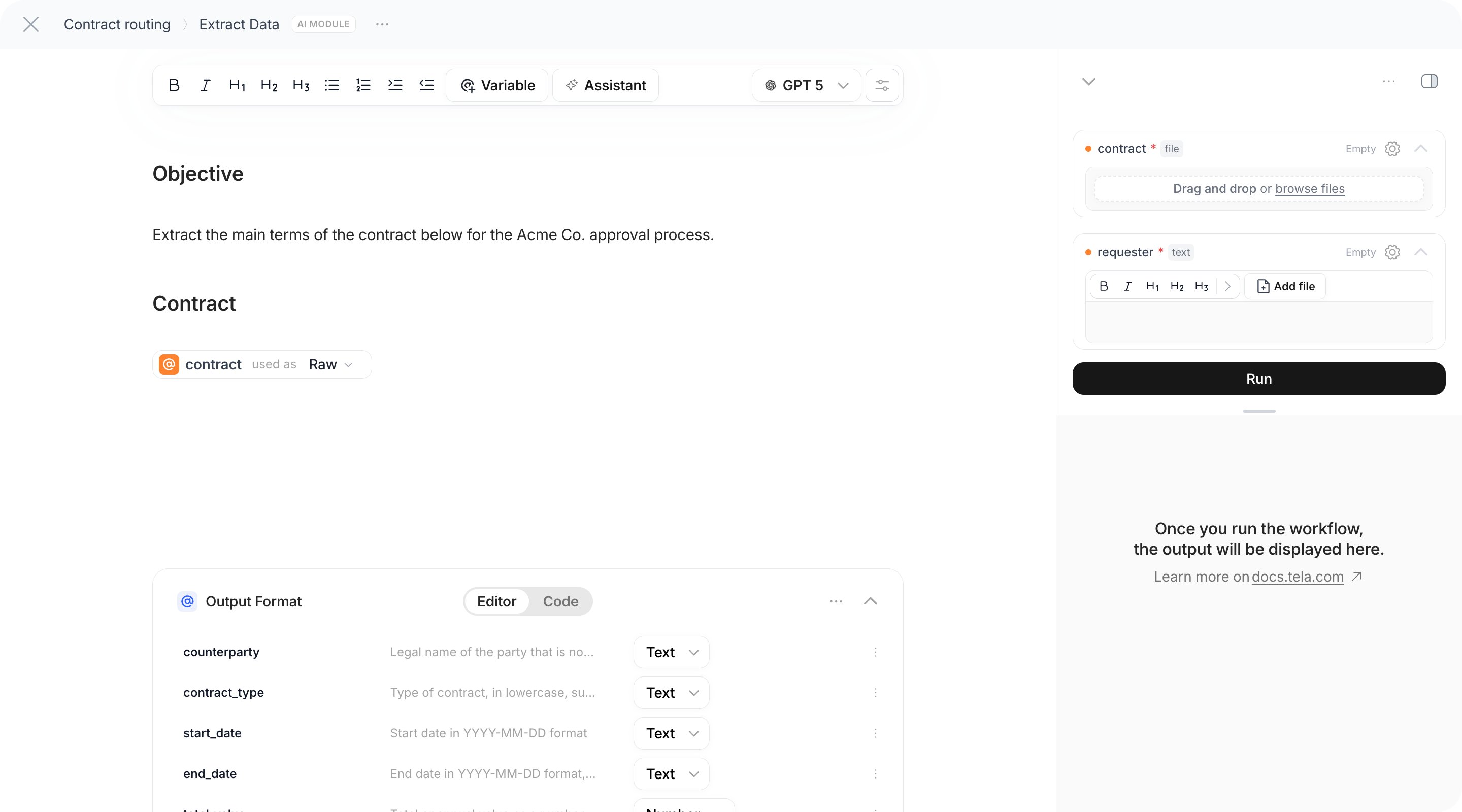
In the running example, Extract Data is an AI Module that reads thecontract Input and returns structured fields, and Draft Escalation Note is a second AI Module that writes a note using those fields.
Configuring the step
1
Name the step
Click the title of the card and replace Untitled Step. The name is how later steps and your code will refer to this output, for example
Extract Data.2
Write the prompt
Write the instruction as you would in a Canvas: what to read, what to return, the rules to follow. Type
@ to insert an Input or the output of a previous step. The prompt editor accepts text and references; see Editing prompts for writing advice.For Extract Data:3
Pick the model
Choose the model for this step. Each AI Module has its own model and temperature, so you can use a strong model for extraction and a cheaper one for the escalation note. The settings are the same as in a Canvas; see Selecting models.
4
Define the Output Format
Add attributes to the Output Format, exactly as in a Canvas: name, type (text, number, boolean, list, object) and an optional description. For Extract Data:
counterparty (text), total_value (number), start_date (text), end_date (text), has_penalty_clause (boolean), summary (text).With an Output Format, the step returns an object and each attribute becomes selectable in the @ menu of later steps, usable in a Condition, and reviewable in Test and in the Workstation. Without one, the step returns plain text.Files in the prompt
A file reference in the prompt is used as Parser by default: the model receives the extracted text of the file. Switch the chip to Multimodal to attach the file itself. This matters for scans, photos and documents whose layout carries meaning. The rules are in Inputs and references.Citations
When the step has an Output Format, you can turn on Citations. The model then returns, alongside each attribute, where in the referenced files the value came from. Results show the citations with the output. Citations are only available for structured output.What the step returns
- With an Output Format: an object with your attributes,
{ "counterparty": "Acme Ltd", "total_value": 125000, ... }. - Without one: a text.
Each AI Module step can cache its result: when the same inputs come in again, the saved result is reused instead of calling the model. Disable the cache on steps that must always run fresh, such as steps that read real-time data.
Classifier
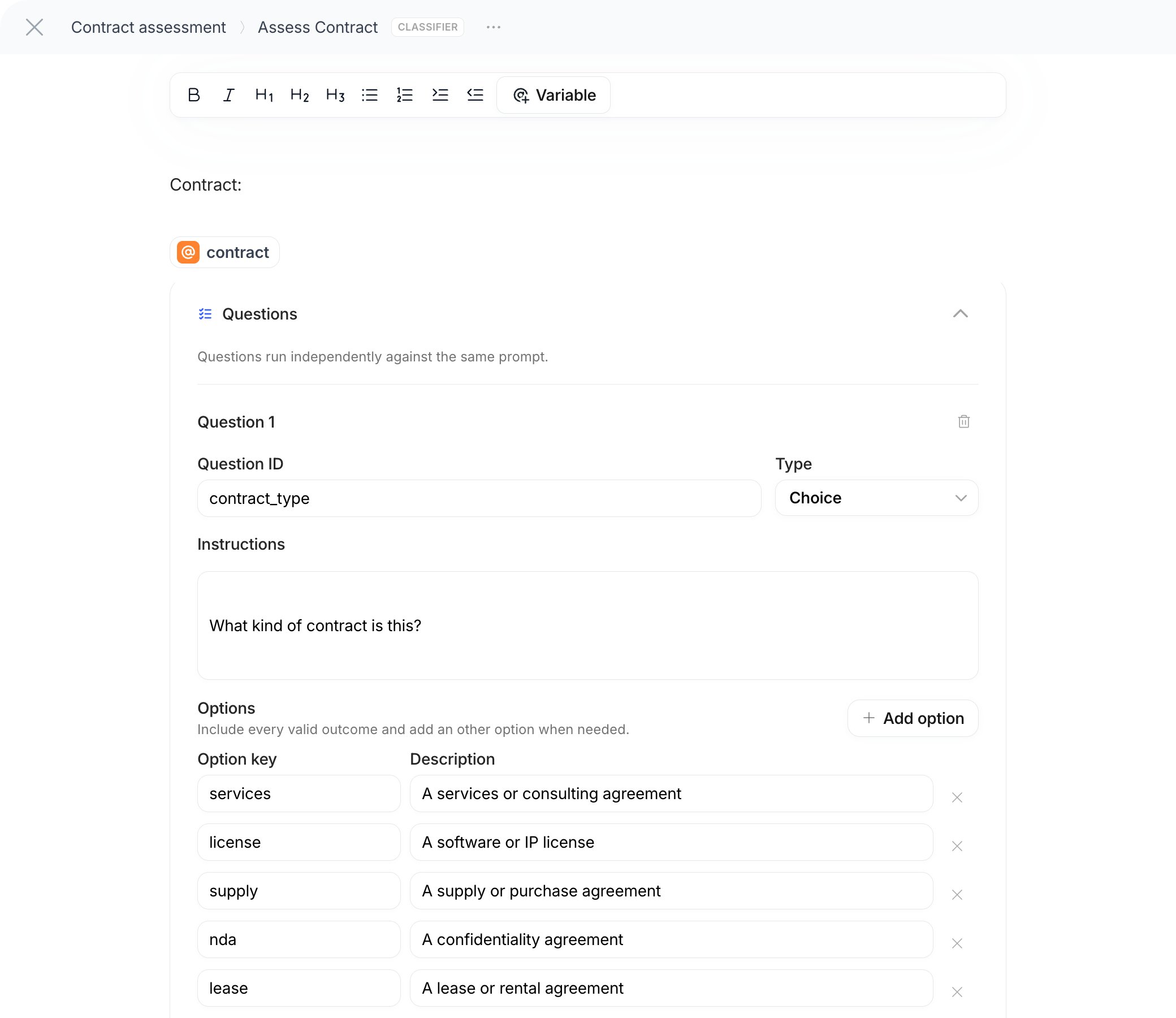
The Classifier answers a set of typed questions about a piece of data and returns, for each question, an answer with probabilities and a confidence. Use it when you need a decision you can measure and route on, rather than free text: “which type of contract is this?”, “how risky is it on a 1–5 scale?”, “does it contain a non-compete clause?”. In the running example, an Assess Contract Classifier sits after Extract Data and answers two questions:contract_type (a choice) and risk_level (a score). The Condition can then route on Assess Contract › answers › contract_type › choice.
Configuring the step
1
Write the Prompt
The Prompt is the context to evaluate: the text, the extracted fields or the document the questions are about. Insert the values from previous steps here, for example the summary and the clauses returned by Extract Data. The field’s hint says to type
/ to insert a variable.2
Add questions
Click Add question. Each question has a Question ID (used as the key in the output, like
contract_type), a Type and Instructions that explain what to evaluate. Questions run independently against the same prompt, so the answer to one does not influence another.3
Define the criteria for each type
- Choice: list the Options, each with an Option key and a Description of when it applies. Include every valid outcome and add an “other” option when needed. At least two options.
- Score: list the Ordered levels, from lowest to highest, describing each point on the scale. Between two and ten levels. The answer is a probability-weighted score across the levels.
- Boolean: optionally describe what True means and what False means. The answer is the probability of yes.
What the step returns
The output has ananswers object keyed by Question ID:
@ menu and in a Condition you reach a value through its path: Assess Contract › answers › contract_type › choice, or answers.risk_level.score in code mode. A Boolean answer is a number between 0 and 1 under noul, so compare it to a threshold in code mode, for example input["Assess Contract"].answers.has_non_compete.noul > 0.5, rather than testing is true. Selectors have no numeric comparison.
The Classifier runs on Tela’s own evaluation model, pinned per version of the module; there is no model selector. A Classifier accepts up to 100 questions.
Choosing between them
Next: route the run on these values with a Condition.